
The whole trip on one canvas
Everything a planner needs in one place — no jumping between a document, a spreadsheet and a slide deck.
Day-by-day planner
Lay out the trip day by day, drag to reorder, and repeat or duplicate days and items without re-keying anything.
Your products & suppliers
Drop in your own products, contracted rates and supplier services — or build reusable components and templates once and reuse them everywhere.
Live pricing & margin
Every line prices as you build — cost, markup, discounts, group brackets and currency — so you always see the customer price and your margin.
Maps & routes
Pin places on a map, show the route, and enrich stops with real place photos and coordinates automatically.
Media-rich & on-brand
Photos, descriptions and your branding throughout, so a proposal looks like a finished piece of collateral, not a form.
Built with your team
Collaborate live with presence and comments, attach files, and keep everyone on the same version of the trip.
From blank canvas to sent proposal
Start however suits the trip, shape it on the canvas, and send it as an interactive proposal — usually in minutes, not hours.
- 1Start itBlank, template, or AI draft
- 2Add days & productsYour inventory & suppliers
- 3Price itMargin, brackets, currency
- 4Brand & previewSee what the customer sees
- 5Send proposalInteractive, accept & pay online
A head start from AI — with you in control
Don't start from a blank page. Import an existing trip with AI from a document, a brief or a link; describe a trip in plain language and have it assembled from your own products; or ask AI to edit what's on the canvas — you review every change before it lands.
Need to quote the same trip a few ways? Save it as variants — a standard, a premium and a budget version, each with its own customer link — without duplicating the work.
See everything the AI can do on the AI features page.
Built to iterate
The best itineraries are rarely one-and-done. Refine, re-price and re-share as many versions as you need — the loop is the point.
- 1DraftBy hand, template or AI
- 2PriceLive cost & margin
- 3PreviewAs the customer sees it
- 4ShareInteractive proposal
- 5FeedbackSave as a new version
- ↻ then repeats
Why teams build in TripCreator
The itinerary is where the sale is won — so the builder is where the platform earns its keep.
Faster to a yes
Rich, branded proposals go out in minutes, so you respond while the lead is hot — customers report itineraries built many times faster.
Margin you can see
Costing is live and per-line, so you never send a price that quietly loses money.
One source of truth
The itinerary a customer accepts flows straight into booking, invoicing and operations — nothing is rebuilt downstream.
Reusable, not repetitive
Templates and components turn your best trips into a starting point for the next one.
See it in action
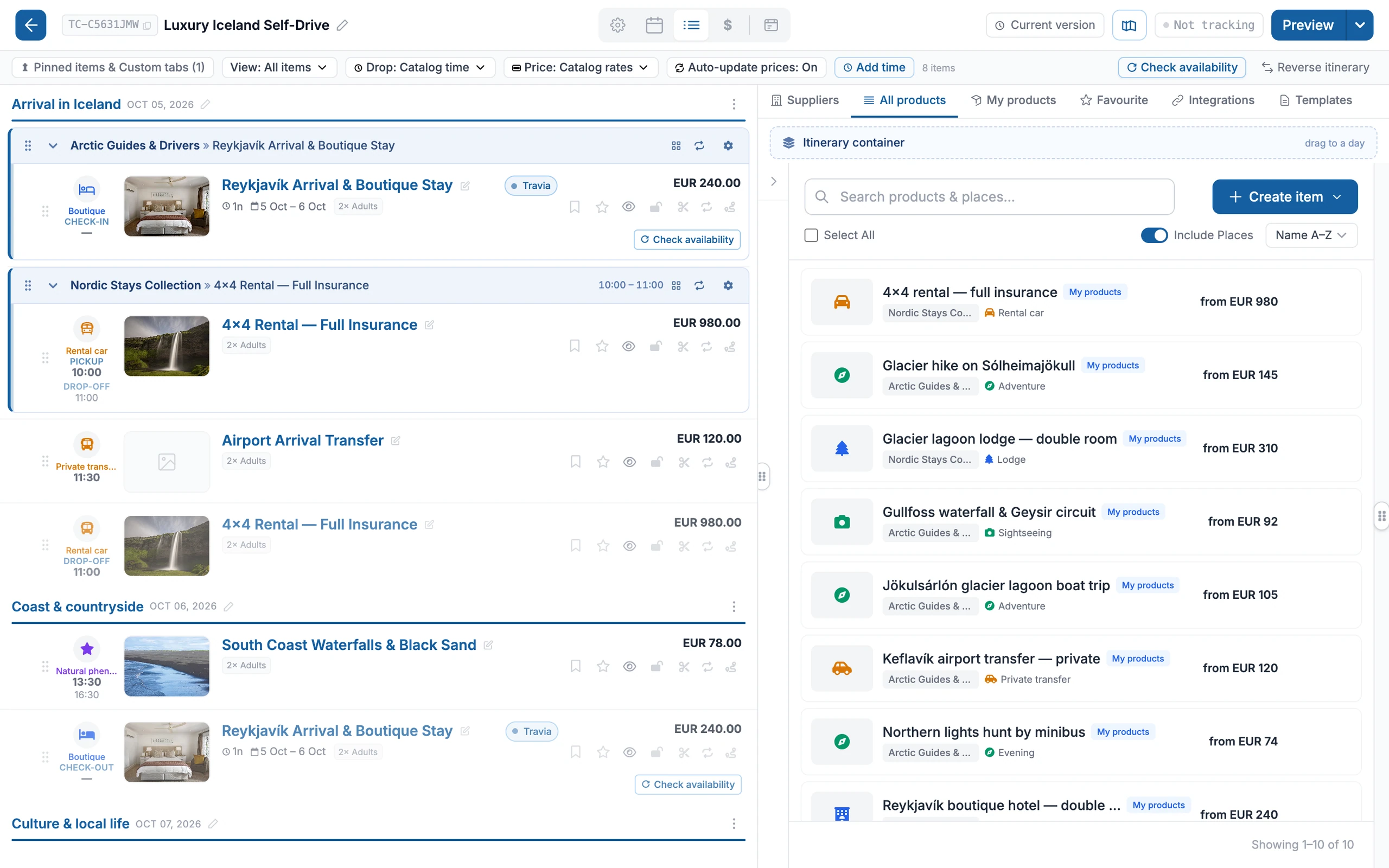
Build the trip day by day — products, timing and live pricing in one place.
Itinerary builder FAQ
- Can I reuse itineraries and components?
- Yes. Save any trip, day or item as a reusable template or component and drop it into new itineraries — so your best work becomes the starting point for the next quote.
- Does pricing update automatically?
- Yes. Every line prices live as you build — cost, markup, discounts, per-group brackets and currency — so you always see both the customer price and your margin, and nothing is calculated by hand.
- Can AI help build the itinerary?
- Yes. You can import a trip with AI from a document, brief or link, generate one from a plain-language brief using your own products, or ask AI to edit the canvas — always reviewing before anything is applied. See the AI features page for detail.
- What does the customer receive?
- An interactive, branded proposal they can explore day by day on any device, with photos, maps and pricing — and accept and pay for online. It's the same itinerary that flows into booking and operations once accepted.
- Can I quote the same trip several ways?
- Yes. Save a trip as variants — for example standard, premium and budget — each with its own customer-facing link, without rebuilding the itinerary each time.
The TripCreator podcast
Prefer to listen?
Episode 1 · 16 min
The spreadsheet tax
Quote, itinerary, booking, invoice. Usually four tools. It could be one.
Episode 4 · 15 min
Bespoke travel, the proposal is the product
For tailor-made trips, the proposal does the selling. Make it a page they want to open.