
AI for travel operators, built into the work you already do
TripCreator's AI turns real itinerary documents into structured, editable trips, writes and translates your travel content, and helps you reply to customers — inside the platform, on your terms. You review everything before anything is created.
What TripCreator AI can do
Practical AI for planning, content and communication — not gimmicks. Everything runs from inside the product, so it fits how your team already works.
Import a document with AI
Upload a quote, proposal, rate sheet or day-by-day PDF — even a scan — and AI reads it into a structured TripCreator itinerary you review before creating.
Build from a brief
Describe the trip in plain language and AI assembles it from your own products and connectors — ready to refine.
Import from a link
Paste a share link from another itinerary platform and AI reads it straight into TripCreator.
AI content writing & translation
Rewrite, shorten, restyle or translate any description, itinerary note or email in one click, in a professional travel voice.
AI-assisted messaging
Draft a reply from the conversation, adjust the tone, translate it, or summarise a long thread in the communications hub.
Auto photos & places
Imported trips are enriched with real place photos and map coordinates — you tick what to keep, nothing is applied blindly.
How Import with AI works
Start three ways — a document, a plain-language brief, or a share link from another platform. They all land on the same review screen, where you stay in control of every field.
Import with AI, in detail
The flagship AI feature — designed so you never trade control for speed.
Three ways in
Upload a document, describe the trip as a brief, or paste a share link from another platform — all land on the same review screen.
Reads real documents
PDFs, Word, Excel rate sheets, PowerPoint decks, photos and scans — up to 25 MB. It reads tables and images, not just plain text.
Never invents
Every field is marked certain, probable, ambiguous or missing. Missing stays empty — the AI does not guess — and conflicting readings are shown as alternatives.
Shows its sources
Each confident field cites the exact wording it came from in your document, so you can check the AI's work at a glance.
Matches your inventory
Extracted suppliers and products are matched to your own CRM and inventory — and you decide whether to create anything new.
Nothing until you confirm
The AI stops at a draft. Only your explicit "Create the itinerary" writes it in — there is no auto-create.
Private by design
The AI returns structured data only — it can't change anything in TripCreator on its own. Extracted data from imports you don't confirm is automatically purged.
Turn it on — and stay in control of cost
TripCreator's AI is an add-on you enable from the Integrations & add-ons App Store. It runs on your own OpenAI API key, so you have full cost control and every request is yours — priced simply as your OpenAI usage, with per-hour and per-day guardrails built in.
Your key is stored encrypted and used only to make requests on your behalf. Because the AI is decoupled from your data, it can read and draft but never mutate your workspace — the review-and-confirm step is always yours.
See it in action
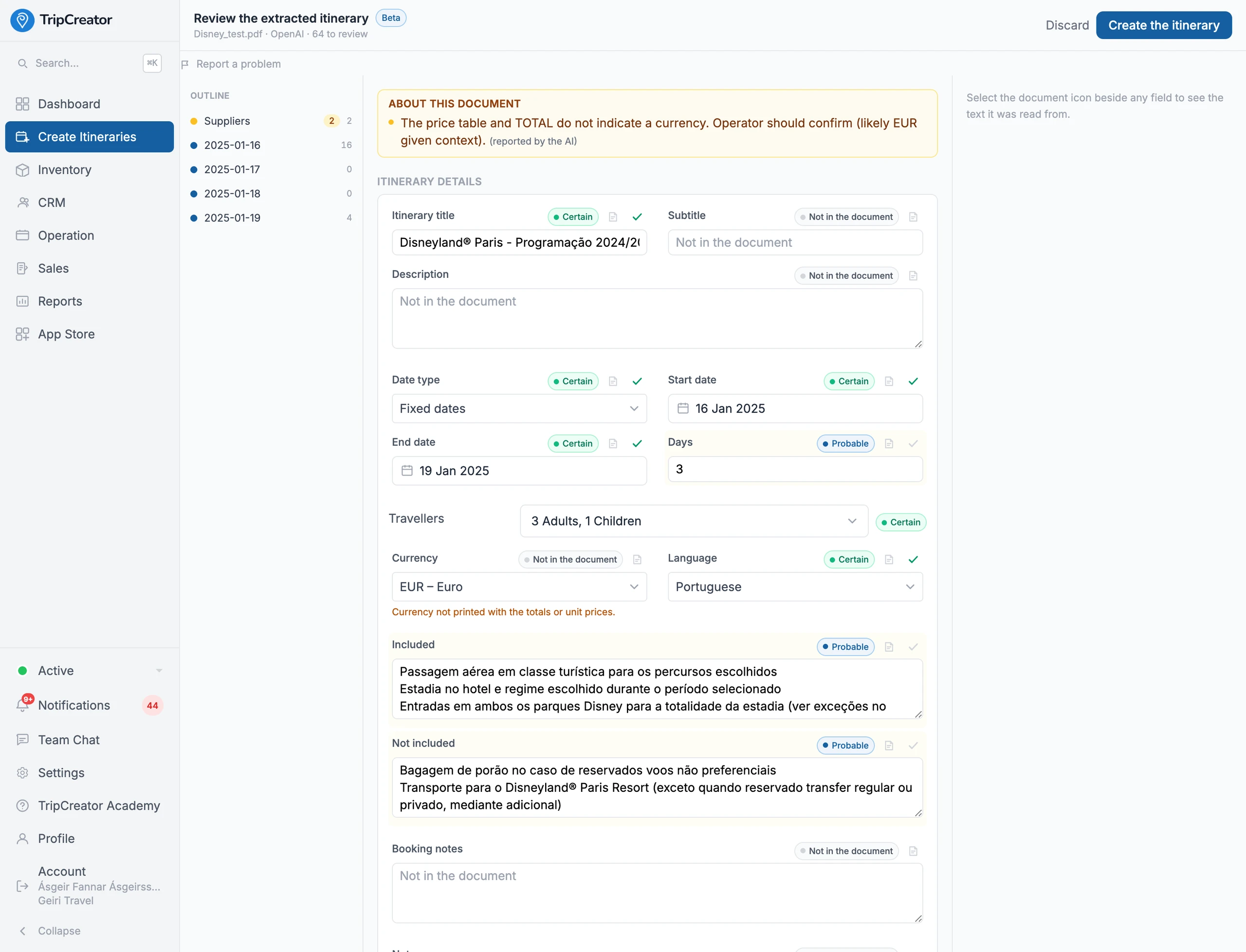
Import with AI — every extracted field shown with its confidence and source, for you to review before anything is created.
AI FAQ
- What can TripCreator's AI do?
- Build itineraries three ways — import a document, describe the trip as a brief, or paste a link from another platform — plus write and restyle travel content, translate any field into your customers' languages, apply your saved content templates, and help you draft and summarise customer messages, all inside the platform.
- What is Import with AI?
- Three ways to start an itinerary from something you already have: upload a document (a PDF quote, supplier rate sheet, proposal or scan), describe the trip in plain language as a brief, or paste a share link from another itinerary platform. The AI reads it into a structured TripCreator itinerary — days, suppliers, products and pricing — that you review field by field.
- Does the AI create itineraries automatically?
- No. The AI produces a draft and stops. It never invents data, it cites the source for every confident field, and nothing is created until you explicitly confirm. You always review first.
- Which files can Import with AI read?
- PDF, images and scans (PNG/JPEG/WebP), Word (DOCX), Excel (XLSX), PowerPoint (PPTX), plain text and CSV — up to 25 MB. You can also start from a plain-language brief or a link instead of a file.
- How is AI enabled and priced?
- Enable the AI add-on from the App Store inside TripCreator using your own OpenAI API key. Pricing is simply your OpenAI API usage — you keep full cost control, with built-in usage caps.
- What happens to my data?
- Documents and text are sent to OpenAI using your own key to fulfil your request; your key is stored encrypted and used only for that. The AI can't modify your workspace, and extracted data from imports you don't confirm is automatically purged.
The TripCreator podcast
Prefer to listen?
Episode 9 · 15 min
AI import, drop in the PDF
TripCreator’s AI reads quotes and programmes and builds the trip, with prices.
Episode 10 · 15 min
Build a trip from a brief
Paste a customer’s brief and get a draft trip built from your own products.